
The FPV flight gives one a thrilling sensation, which involves speed, accuracy, and cinematic movements. Nevertheless, it is often difficult to avoid shaky videos as a result of rapid movements, propeller wash, and vibrations. That is when Gyroflow becomes indispensable.
We will explain what Gyroflow is, how it works, its key features, provide tips for effective video stabilization, and compare it with ReelSteady and similar applications.
What Is Gyroflow?
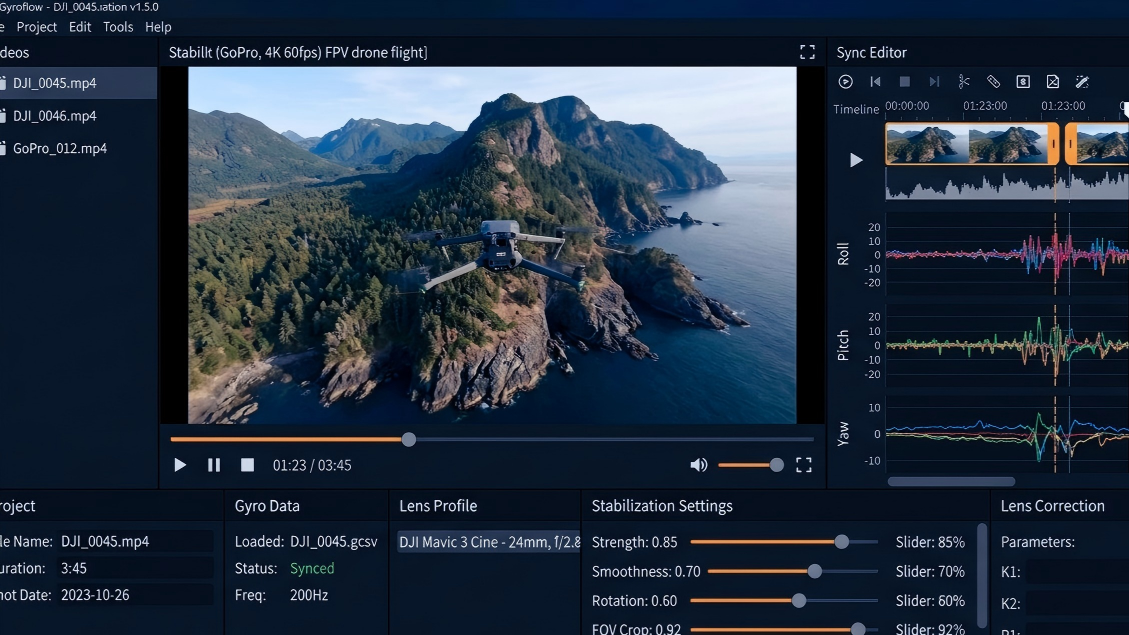
Gyroflow is an open-source video stabilization software designed for FPV drones, action cameras, and cinematic video systems. It reads gyro data directly from compatible cameras and FPV systems, allowing the software to calculate camera movement with much higher precision than traditional pixel-based stabilizers.
The software is mainly used to reduce common FPV video issues such as rapid shaking, prop wash vibrations, roll oscillations, micro jitters, and unstable movements caused by aggressive flying. Because stabilization is based on real motion data instead of visual estimation alone, the final footage usually looks smoother while still preserving the natural feeling and responsiveness of FPV flight.
One of Gyroflow’s biggest advantages is its broad compatibility and advanced feature set. It supports devices such as GoPro cameras, DJI O3 Air Unit, DJI Avata, Insta360 cameras, Sony cameras, and Blackmagic cameras. Features like lens correction, horizon leveling, rolling shutter correction, GPU acceleration, and custom lens profiles have made it one of the most widely used stabilization tools among FPV pilots and cinematic drone creators.

Fig. 1 Gyroflow Workshop
How Gyroflow Works
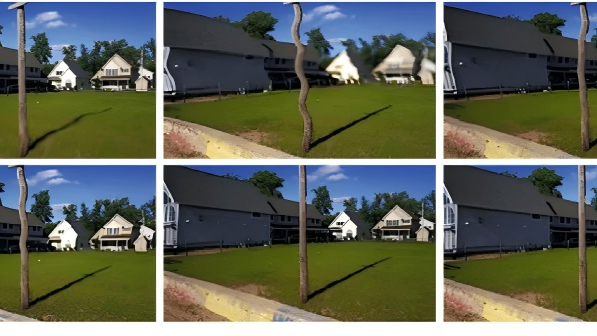
Traditional stabilization tools, such as Warp Stabilizer in Premiere Pro, analyze moving pixels inside a video and attempt to estimate unwanted camera shake. While this method works reasonably well for standard handheld footage, it often struggles with aggressive FPV movement and may create warping, “jello” artifacts, or excessive cropping.
Gyroflow uses a different workflow built around gyro data synchronization and mathematical motion correction.
1. Data Synchronization
First, Gyroflow matches the recorded video file with the gyro data captured during flight. This data contains detailed motion information such as pitch, roll, and yaw recorded thousands of times per second.
2. Mathematical Stabilization
Once synchronized, the software calculates the exact movement path of the camera and digitally compensates for unwanted motion by rotating and stabilizing the frames accordingly.
3. Lens Profile Correction
Finally, Gyroflow applies a matching lens profile to correct distortion from ultra-wide or fisheye lenses before stabilization is processed. This helps maintain cleaner edges and more natural image geometry.

Fig. 2 FPV Drone and Action Camera
Key Features of Gyroflow
Gyroflow includes several advanced tools designed specifically for FPV and action-camera workflows.
- Advanced Lens Correction: Wide-angle FPV cameras often produce fisheye distortion. Gyroflow corrects this distortion before stabilization, resulting in cleaner and more natural footage.
- Horizon Lock: The software can keep the horizon perfectly level, even during flips or inverted flight. This feature is especially useful for cinematic cruising and smooth aerial shots.
- GPU-Accelerated Rendering: Gyroflow supports GPU acceleration on Windows, macOS, and Linux, allowing fast rendering speeds and smoother editing workflows.
- Lower Cropping Requirements: Because the software already knows the camera’s movement path from gyro data, it often requires less image cropping than traditional stabilization tools.
FPV Stabilization Checklist for Gyroflow
Good stabilization starts before importing footage into the software. Clean gyro data and stable hardware will always produce better final results.
Eliminating Physical Vibration (The Basics): Ensure that the camera mount (TPU cradle) is secure and replace any damaged propellers. High-frequency vibrations in the airframe (known as "Gyro Noise") can distort gyroscope data—a problem that even the most sophisticated post-processing algorithms cannot fix.
Disable In-Camera Stabilization: You must disable GoPro HyperSmooth or DJI RockSteady during recording; otherwise, the gyroscope data will not align precisely with the video footage during post-processing.
Lock Shutter Speed and Use ND Filters: Set the shutter speed to at least twice your frame rate (e.g., 1/120s) to avoid "motion blur" caused by slow shutter speeds; otherwise, the footage may exhibit a strange "jello" effect after stabilization.
Precise Alignment (Auto-Sync): After importing your footage, always verify the alignment curve on the timeline. If automatic alignment fails due to excessive vibration, manually mark a specific moment on the timeline—such as a sudden throttle surge or a major roll maneuver—to serve as a manual synchronization point.
Enable Dynamic Zoom: Be sure to check this option. It allows the software to automatically zoom in only during intense maneuvers, reverting to the ultra-wide-angle view during smooth flight segments, thereby avoiding a rigidly cropped field of view throughout the entire video.
Gyroflow vs. ReelSteady
When choosing between Gyroflow and ReelSteady, the decision mainly depends on your camera ecosystem and how much control you want over stabilization settings.
|
Feature |
Gyroflow |
ReelSteady |
|
Price |
Free and open-source |
Paid software |
|
Camera Support |
GoPro, DJI, Sony, Insta360, Blackmagic, and more |
Primarily GoPro |
|
Workflow |
Advanced controls and customization |
Simple one-click workflow |
|
Customization |
Deep sync and stabilization tuning |
Limited manual control |
|
Performance |
GPU-accelerated rendering |
More simplified processing |
ReelSteady is often preferred by users who want a fast and simple stabilization workflow for GoPro footage. Gyroflow, on the other hand, is better suited for pilots who use multiple camera systems or want deeper control over stabilization behavior, cropping, synchronization, and lens correction.
Conclusion
From freestyle drones and cinematic cruisers to action cameras and professional cinema rigs, Gyroflow offers a powerful combination of flexibility, compatibility, and performance. Features such as horizon lock, lens correction, GPU acceleration, and dynamic zoom make it suitable for both beginners and experienced creators.
Gyroflow has become one of the most important stabilization tools in modern FPV filmmaking. By using real gyro data instead of relying only on visual frame analysis, it produces smoother and more natural footage while preserving the immersive feel of FPV flight.

Leave a comment
This site is protected by hCaptcha and the hCaptcha Privacy Policy and Terms of Service apply.