
Flying FPV (First-Person View) drones offers a unique perspective, putting pilots directly “inside” the drone. This immersive experience, however, depends on how quickly the visual feed reaches your eyes.
FPV latency—the delay between what the drone sees and what the pilot perceives—plays a critical role in responsiveness and control. Here, we will discuss what FPV latency is, how it arises, why it matters, ways to reduce it, and the characteristics of different systems available today.
What Is FPV Latency?
The FPV latency refers to the amount of time that elapses from when the drone's camera takes the picture to when the image shows up on your goggles or display screen. Any delays, however brief in milliseconds (ms), will have an impact on accuracy and maneuvering.
While analog systems usually show an FPV latency of 30 to 50 ms, digital FPV latency may vary significantly, ranging from as low as 20 ms to above 100 ms, based on the compression process and equipment efficiency.
How FPV Latency Works
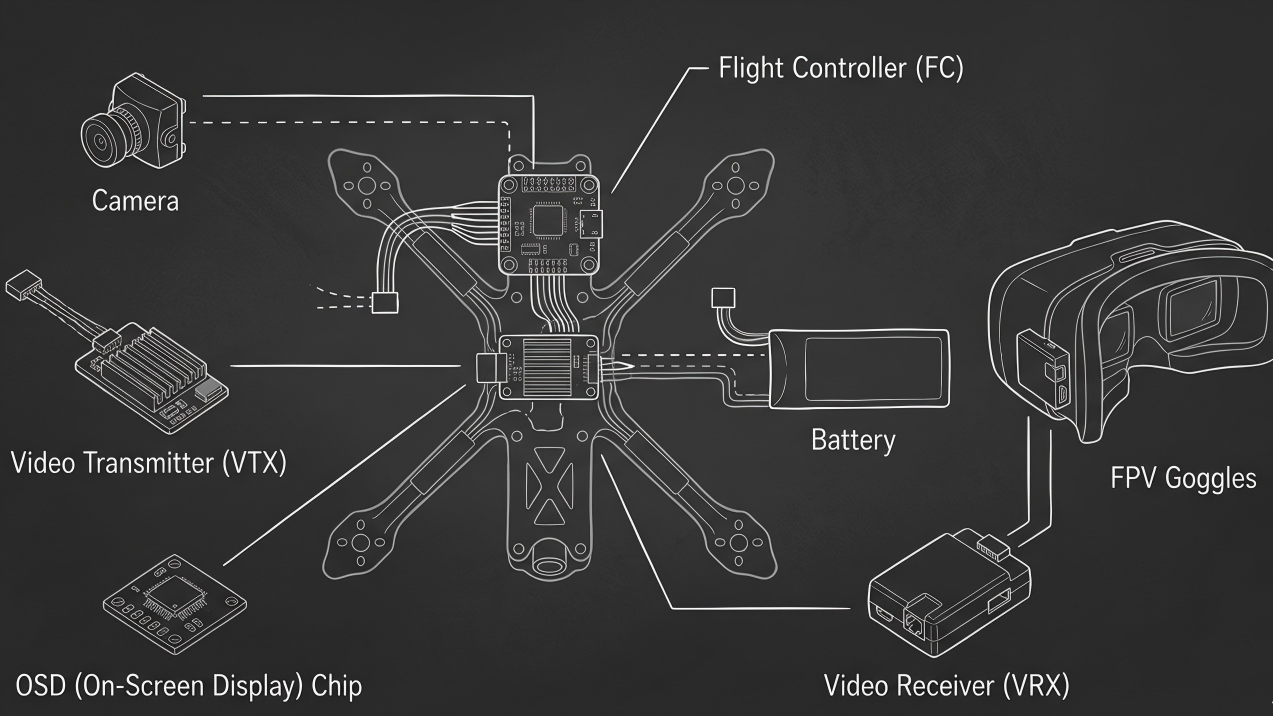
Latency takes place during several stages in the FPV video stream:
- Camera Recording: In analog cameras, raw footage is recorded without any delay. On the other hand, digital cameras need to process and compress images, which leads to additional latency.
- Video Transmission: Analog signals transmit undistorted waves, while digital video signals encode and compress information into frames. The latter requires more processing and adds some latency but improves image quality and resolution.
- Decoding and Rendering: The receiving device decodes and renders information for the monitor or goggles. Some devices may perform additional image processing, such as adding overlays, which adds a few milliseconds of latency.
- Pilots’ Response Time: Even though a person’s response is usually within the range of 200-250 ms, low-latency video allows the pilot to operate the drone based on up-to-date information.
It is important to note that all stages in the video stream contribute to the overall latency.
Why FPV Latency Matters
FPV latency impacts many aspects of FPV flight including:
- Racing Precision: During racing, any delay, however short, can lead to missing gates or crashing into obstacles. Reduced latency ensures instant responsiveness to the drone's location and surroundings.
- Freestyle Flights: Acrobatic maneuvers such as flips, rolls, and dive require precise timing. Increased latency will make it difficult for pilots to execute maneuvers smoothly and safely.
- Flight Safety: Latency impacts how fast pilots can act on changes in altitude or obstacles. With reduced latency, pilots are able to have better control over their drones.
- Immersion Experience: With lower latency, pilots have the impression that they are inside their drones. Higher latency feels more like viewing a live video feed and less of extending one's senses through the drone.
- Pilot Skill Development: Training on low-latency systems improves a pilot's reaction time. High-latency systems may make training difficult and even hinder the development of useful skills on higher latency.

Fig. 1 FPV System Components
How to Reduce FPV Latency
Several strategies can help minimize latency in FPV systems:
1. Camera Choice
Use high-speed analog or low-latency digital systems, such as HDZero or high-refresh DJI. For example, the Droneer FPV drone achieves just 15 ms latency with its O4 Pro digital system, ensuring ultra-responsive flight. Its transmission supports 1080p/100 FPS and 60 Mbps bitrate, with analog mode offering 3 ms latency for maximum responsiveness. Advanced features like 10-bit D-Log M and 155° ultra-wide view enhance the experience without adding delay.
Analog cameras generally provide the lowest latency because they transmit raw video directly. Digital cameras, while capable of higher resolution, add processing delays. Some modern digital cameras, designed with low-latency modes, reduce these delays considerably.
2. Transmission System
The choice of transmitter and receiver also affects latency. Digital systems encode and compress video, so their latency can vary based on processing speed. High-speed transmission protocols are designed to reduce this delay, but factors like signal interference and range can influence performance.
To further reduce latency, pilots should select low-latency systems—analog setups offer near-instant video, while HDZero achieves 18–22 ms. Increasing frame rates on digital systems, maintaining strong signal strength with higher VTX power and quality antennas, using high-speed transmission protocols, and positioning antennas for clear line-of-sight, including directional antennas on goggles, all help minimize additional delay caused by interference or distance.
3. Display Settings
Many goggles and monitors have image enhancements such as sharpening, overlays, or deinterlacing. These features improve clarity but add processing time. Disabling non-essential features can reduce latency.
The display panel itself contributes to FPV latency. High-quality OLED screens typically add only 1–3 ms, offering the fastest response for highly responsive flying. Premium LCD (IPS) panels have slightly higher latency, around 2–5 ms, which is sufficient for most flight scenarios. Budget LCD panels, often found in sub-₹5,000 goggles, can introduce 5–15 ms of delay, noticeably increasing total system latency. Disabling non-essential image enhancements like overlays, sharpening, or deinterlacing can further reduce processing time and improve responsiveness.
4. Signal Quality
Maintaining strong, clean signal paths reduces retransmission delays. Good antenna positioning, minimal obstructions, and avoiding RF interference can improve both latency and image quality.
5. System Optimization
Combining components with low inherent latency—camera, transmitter, receiver, and display—results in a faster end-to-end system. Each component contributes a few milliseconds, so cumulative optimization is important.

Fig. 2 Latency vs Resolution vs Cost
Products for Low-Latency FPV
Over the past few years, several brands have emerged in low-latency FPV systems:
- HDZero (formerly Shark Byte): Known for ultra-low-latency digital video, HDZero provides clear, high-definition feeds with latency as low as 28 ms. It strikes a balance between analog-like responsiveness and HD quality, making it popular among racers and freestyle pilots alike.
- Runcam: Originally famous for analog FPV cameras, Runcam has embraced digital FPV with products that focus on low latency, small form factor, and easy integration. Runcam hybrid systems allow pilots to switch between analog and digital modes depending on flight needs.
- Caddx Vista: Often paired with DJI digital systems, Caddx Vista modules offer compact, efficient, low-latency digital video. While slightly higher latency than HDZero, it delivers excellent image quality for freestyle and cinematic flying.
- DJI FPV System: DJI’s FPV digital kit has higher latency (often 40–50 ms) than HDZero but offers ultra-clear video and strong range. For cinematic or long-range flying, this tradeoff is often acceptable.
- Analog Systems: Legacy analog systems like Fat Shark cameras and transmitters remain popular for racing due to extremely low latency, simple setup, and robust performance in tight environments.
FPV System Comparison: Latency, Resolution, and Relative Cost
Let’s put together a comprehensive, objective comparison of the main FPV systems in terms of latency, resolution, and cost. We’ll include analog, digital, and hybrid systems for a clear picture.
|
Brand / System |
Latency (ms) |
Resolution |
Relative Cost |
Notes |
|
HDZero (Shark Byte) |
28–32 |
720p HD |
$$ |
Ultra-low latency digital video |
|
Runcam (Hybrid / Digital) |
30–40 |
720p–1080p |
$$ |
Switchable analog/digital modes |
|
Caddx Vista |
45–50 |
720p HD |
$$ |
Compact digital HD module |
|
DJI FPV System |
40–50 |
720p–1080p HD |
$$$ |
Full HD, higher latency |
|
Analog Systems |
30–50 |
480p–600p |
$ |
Simple, low-latency analog feed |
Note:
Analog systems and HDZero offer the lowest latency for fast, responsive video, while digital systems like DJI and Caddx Vista add extra milliseconds due to HD encoding. Digital systems provide higher-resolution HD video, whereas analog is lower resolution but simpler and quicker. Analog setups are generally more affordable, while digital systems range from medium to high cost.
Overall, lower latency usually comes at the expense of resolution or complexity, while higher-resolution systems slightly increase latency.
Conclusion
Whether you are a racing pilot flying around gates at breakneck speeds, an action pilot doing impossible aerial maneuvers, or simply a recreational pilot aiming to have a more immersive flight, latency is essential.
From the choice of cameras used to the actual methods of transmission and even the settings on your display screen, everything about your FPV system adds to the total latency time.

Leave a comment
This site is protected by hCaptcha and the hCaptcha Privacy Policy and Terms of Service apply.